Queenline: A Bold Script Font for Modern Web Design
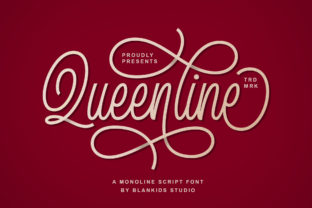
In the crowded landscape of digital interfaces, typography is often the first element that communicates a brand’s personality. As web designers and UI creators, we constantly search for typefaces that strike a delicate balance between aesthetic appeal and functional clarity. Queenline emerges as a compelling solution in this space, offering a beautiful monoline script with a bold and unique touch. Unlike traditional calligraphy fonts that can feel overly ornate or difficult to parse on screens, Queenline brings an authentic feel that resonates with modern users while maintaining the elegance expected of premium display fonts.
Defining Visual Hierarchy with Authentic Script
Visual hierarchy is the backbone of effective web design. It guides the user’s eye through content, ensuring they understand what is most important. Queenline excels in this role when used strategically in headers, hero sections, and landing page introductions. Its monoline structure provides a consistent stroke weight that remains legible even at larger sizes, making it ideal for capturing attention without overwhelming the layout.
When designing a landing page for a creative agency or a boutique online store, the hero section needs to make an immediate impact. Using Queenline for the main headline creates a focal point that feels both personal and professional. The font’s bold character ensures it stands out against background images or solid color blocks, while its script nature adds a human touch that sterile sans serif fonts often lack. This authenticity helps build trust, a critical factor in conversion-focused layouts where user engagement determines success.
Strategic Applications in Digital Products
Understanding where to place a script font like Queenline is crucial for maintaining usability. It is not designed for long-form body copy, but rather for short, impactful phrases. Here are several high-value applications for digital product creators:
- Hero Titles and Banners: Use Queenline to highlight key value propositions on homepages. Its unique touch draws the eye immediately.
- Call-to-Action Areas: While not suitable for small button text, it works well for decorative labels above primary buttons, adding context and flair.
- Blog Graphics and Social Media: Create cohesive brand assets by using Queenline for quote overlays, blog post headers, and Instagram story templates.
- Course and Coaching Pages: For educational platforms, this font adds a mentor-like warmth to section headings, making complex topics feel more approachable.
- Logo Design and Branding: Its distinct personality makes it a strong candidate for logo marks, especially for brands focusing on lifestyle, beauty, or artisanal products.
By restricting Queenline to these specific roles, you preserve its impact. Overusing a script font can lead to visual fatigue, but when used sparingly as an accent within a broader system of modern typography, it elevates the entire design.
Readability and Responsive Considerations
One of the biggest challenges with script fonts is ensuring readability across devices. Mobile screens present unique constraints, where space is limited and users scan content quickly. Queenline’s monoline design aids in this regard, as the uniform thickness prevents thin strokes from disappearing on lower-resolution displays or when scaled down.
However, prudent design practices are still necessary. When using Queenline on mobile, ensure sufficient line height and letter spacing to prevent characters from touching. Avoid placing script text over busy image backgrounds unless a strong overlay or shadow is applied. For dark backgrounds, consider using a slightly lighter weight if available, or ensure high contrast to maintain legibility. On light backgrounds, the bold nature of Queenline ensures it holds its ground, providing a clear anchor for the viewer’s attention.
For UI designers working on app screens, consider using Queenline only for welcome screens or profile headers where text is static and large. Avoid using it for navigation labels or interactive elements where quick recognition is paramount. The goal is to enhance the user experience, not hinder it with decorative complexity.
Effective Font Pairing for Brand Identity
A script font rarely stands alone in a comprehensive web design project. To create a balanced and professional look, pairing Queenline with complementary typefaces is essential. The contrast between the organic flow of a handwritten font and the geometric precision of a sans serif font creates a dynamic tension that is visually pleasing.
For a clean, modern aesthetic, pair Queenline with a neutral sans serif font for body copy. This combination works exceptionally well for SaaS founders and tech startups who want to inject personality into their brand without sacrificing clarity. The sans serif handles the heavy lifting of information delivery, while Queenline adds emotional resonance to headlines.
Alternatively, for a more editorial or luxury feel, consider pairing Queenline with a classic serif font. This approach is ideal for fashion blogs, high-end online stores, or portfolio sites where sophistication is key. The serif font provides a traditional, trustworthy foundation, allowing Queenline to act as a stylish accent that highlights specific details or quotes. Regardless of the pairing, ensure that the secondary font does not compete for attention. The script should remain the star of the show in designated areas.
Licensing and Technical Implementation
Before integrating Queenline into any client project or digital product, it is vital to review the licensing terms. Commercial font licensing varies depending on usage, such as web embedding, app integration, or print materials. Ensure that the license covers the intended scope, including the number of pageviews for webfonts if applicable.
From a technical standpoint, check the available file formats. Webfont formats like WOFF and WOFF2 are optimized for fast loading times, which is critical for SEO and user experience. Verify if the font package includes alternates or ligatures, which can add further customization options for logo design and unique header treatments. Multilingual support is another factor to consider if your audience spans different regions, ensuring that the authentic feel of Queenline translates across various character sets.
Incorporating Queenline into your design assets library offers a versatile tool for enhancing brand identity. Whether you are crafting a course sales page, designing a new logo, or refreshing a landing page, this script font provides the bold, unique touch needed to stand out in a digital world. By focusing on usability, strategic placement, and thoughtful pairing, you can leverage Queenline to create web experiences that are not only beautiful but also effective in driving engagement and building trust.